Projector Lens Shift and Zoom Explained for Home Theater

Affiliate disclosure: Some links on this page are affiliate links. If you buy through them we earn a small commission at no extra cost to you. Recommendations are research-driven; we don't claim personal use of every product reviewed. Product prices and availability are accurate as of the date published and are subject to change. Always check Amazon for current pricing before purchasing. Learn more.
Quick Picks
XGIMI HORIZON 20 4K RGB Triple Laser Home Projector, 3200 ISO Lumens, Google TV with Licensed Netflix, Optical Zoom & Lens Shift, IMAX Enhanced, Dolby Vision, 300" Display, 240Hz, 1ms Input Lag
Buy on AmazonXGIMI HORIZON 20 Pro 4K RGB Triple Laser Home Projector, 4100 ISO Lumens, Google TV with Licensed Netflix, Optical Zoom & Lens Shift, IMAX Enhanced, Dolby Vision, 20,000:1 Contrast, 1ms Input Lag
Buy on AmazonJMGO N3 Ultimate 4K Triple Laser Projector, 5800 ISO Lumens, 3-in-1 Lens Shift, Optical Zoom, AI Gimbal, 20000:1 Contrast, 1ms Low Latency, VRR & ALLM, Dolby Vision Home Theater.
Buy on Amazon| Product | Price Range | Top Strength | Key Weakness | Buy |
|---|---|---|---|---|
| XGIMI HORIZON 20 4K RGB Triple Laser Home Projector, 3200 ISO Lumens, Google TV with Licensed Netflix, Optical Zoom & Lens Shift, IMAX Enhanced, Dolby Vision, 300" Display, 240Hz, 1ms Input Lag also consider | $$ | Buy on Amazon | ||
| XGIMI HORIZON 20 Pro 4K RGB Triple Laser Home Projector, 4100 ISO Lumens, Google TV with Licensed Netflix, Optical Zoom & Lens Shift, IMAX Enhanced, Dolby Vision, 20,000:1 Contrast, 1ms Input Lag also consider | $$ | Buy on Amazon | ||
| JMGO N3 Ultimate 4K Triple Laser Projector, 5800 ISO Lumens, 3-in-1 Lens Shift, Optical Zoom, AI Gimbal, 20000:1 Contrast, 1ms Low Latency, VRR & ALLM, Dolby Vision Home Theater. also consider | $$ | Buy on Amazon |
Projector lens shift and zoom are two of the most under-explained specs in home theater shopping, and getting them wrong means remounting hardware or permanently living with a misaligned image. If you are still deciding where projectors fit into your setup overall, the Projectors hub is a useful starting point before going deeper on specific features.
Understanding these controls upfront changes how you evaluate every other spec on the box. Brightness, contrast, and resolution all depend on the projector ending up in the right physical position. This article breaks down what lens shift and zoom actually do, how they interact, and where three current mid-range laser projectors land on both axes.
What Projector Lens Shift and Zoom Actually Are
Lens shift and zoom are both optical adjustments, but they solve different problems. Zoom controls how large the image appears at a given throw distance. Lens shift controls where the image sits relative to the lens center without moving the projector body.
Zoom: Throw Ratio and Image Size
Throw ratio is the relationship between the distance from the lens to the screen and the width of the projected image. A projector with a 1.5:1 throw ratio placed 150 inches from the screen produces a 100-inch-wide image. Optical zoom changes the effective throw ratio across a continuous range, so you can fine-tune image size without physically repositioning the unit.
This matters more than people expect. Fixed-lens short-throw projectors give you almost no flexibility once they are placed. A projector with a 1.2:1 to 1.5:1 optical zoom range, by contrast, can cover several screen sizes from the same shelf or ceiling mount location. Digital zoom is not a substitute here. Digital zoom crops the image panel and reduces resolution. Optical zoom uses the glass to scale the image while preserving full native resolution output.
Lens Shift: Vertical and Horizontal Offset
Lens shift moves the projected image up, down, left, or right by physically shifting the lens assembly inside the chassis. The projector body stays put. The image moves.
Most home theater projectors offer vertical lens shift. Horizontal lens shift is less common and narrows the field significantly at the mid-range tier. Vertical shift is expressed as a percentage of image height. A projector with plus or minus 60 percent vertical shift can move the image up to 60 percent of the image height above or below the lens center. On a 120-inch screen with a 60-inch image height, that is 36 inches of vertical adjustment range. That is the difference between a projector that works on your shelf and one that does not.
Keystone correction is not lens shift. Keystone is a digital process that geometrically warps the image to compensate for off-axis placement. It discards pixels and introduces softness into what should be a sharp image. Lens shift keeps the optical path clean and the full pixel budget intact.
How Lens Shift and Zoom Work Together
Think of zoom as the coarse adjustment and lens shift as the fine adjustment for image placement. Zoom gets the image to roughly the right size for your screen. Lens shift moves that sized image into alignment with your screen’s center without touching the mount.
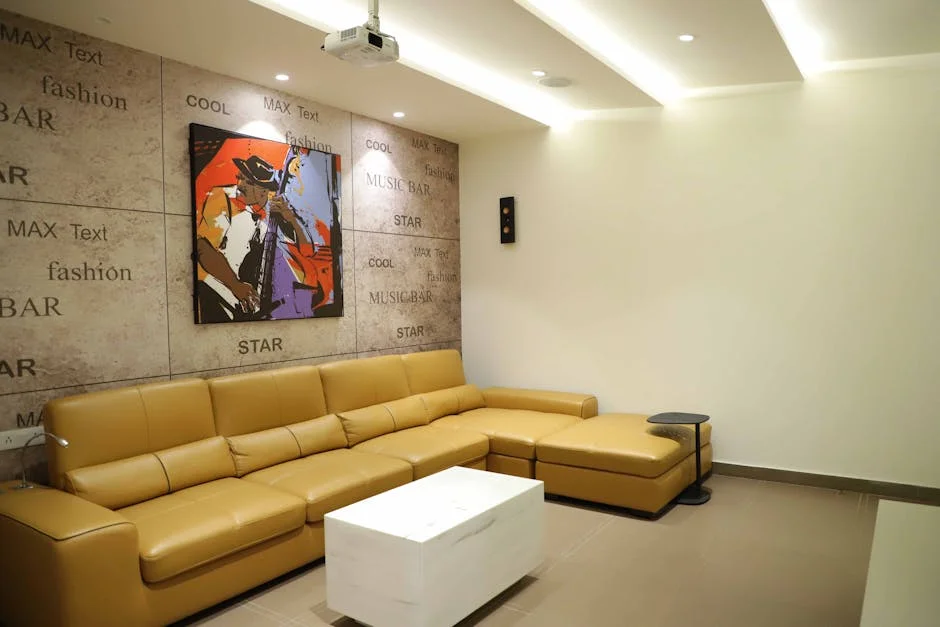
In a dedicated room setup, the standard ceiling mount scenario places the projector behind the seating row, above the sightline, pointed at the screen. With adequate vertical lens shift, the projector body can sit level and the lens moves the image down to screen center. Without lens shift, the projector has to be angled downward using keystone, which introduces the distortion described above, or the mount has to be positioned very precisely to put the lens exactly on the screen’s horizontal centerline.
The same logic applies to shelf placement. A projector sitting on a rear equipment shelf is typically below screen center in a dedicated room. Positive vertical shift raises the image to meet the screen without tilting the chassis.
Horizontal shift solves asymmetric room problems: columns, doors, or constraints that push the projector off the room’s center axis. Most mid-range units offer limited horizontal shift or none at all, so asymmetric rooms often require either a projector with horizontal shift or accepting minor keystone with geometric distortion.
The combination of zoom range and lens shift range defines the projector’s placement envelope. Wider zoom range means more flexibility in throw distance. Wider shift range means more flexibility in vertical (and horizontal) positioning. Both specs together tell you whether a projector will physically work in your room before you buy it.
Why This Matters for Real Room Placement
The practical reason to care about projector lens shift zoom specs is that rooms are not built to projector specifications. Ceilings are standard heights. Walls have structural features. Furniture layouts impose constraints. A projector with tight placement requirements goes into a room that was designed around people, not optics.
Ceiling Mount Scenarios
Standard ceiling mounts drop the projector body to a specific height. The lens center ends up at some distance above screen center. How much distance depends on room height, screen height, and mount length. Vertical lens shift absorbs that offset and keeps the image on the screen without keystone. Field reports from AVS Forum installation threads consistently show that projectors with less than 50 percent vertical shift create real problems in rooms with 9-foot ceilings and 100-plus-inch screens, because the geometry simply does not work out without angling the chassis.
Shelf and Rear-Wall Placement
Shelf setups are common in rooms that are not dedicated theaters, including converted bonus rooms and living rooms. The shelf is usually lower than ideal. Upward vertical shift compensates. Zoom range allows the projector to hit the target screen size even if the shelf-to-screen distance is not optimal. Projector Central’s placement calculator is the most reliable free tool for running these numbers before you commit to a mount location.
Screen Placement is Not Negotiable
Here is the opinion worth stating plainly: the screen matters as much as the projector, and most buyers get this backwards. An average projector on a quality screen looks better than a quality projector on a basic screen. Verified buyers of ALR screens on Amazon and AVS Forum consistently report more visible improvement from the screen upgrade than from equivalent projector upgrades. Lens shift and zoom help you place the projector correctly. A quality screen is what the correctly-placed projector actually needs to perform against. Neither is optional if you want consistent results.
Smart TV Integration and the Placement Penalty
Current mid-range laser projectors increasingly include Android TV or Google TV operating systems with licensed streaming apps. That integration is genuinely useful. It also adds heat, fan noise, and software complexity to a device that needs to sit in a specific location for optical reasons. Placement flexibility, defined by lens shift and zoom range, determines whether the projector can sit where it is comfortable to use, rather than where the optics barely work. Projectors with wider shift and zoom ranges give you more room to optimize for cable routing, ventilation clearance, and ambient light control simultaneously. For a broader look at how these specs compare across projector categories, the projector buying guide covers the full range of use cases.
Top Picks for Optical Zoom and Lens Shift at the Mid-Range Tier
These three units represent the current mid-range laser projector field with documented optical zoom and lens shift implementations. Spec data and owner reports from Amazon verified buyers, AVS Forum, and RTINGS community threads informed the analysis below. Adrian’s reference point is the Epson 4010, an LCD 4K-enhanced projector that defined the mid-range ceiling for several years. The laser units below address the light source longevity gap that was always the Epson’s structural disadvantage.
XGIMI HORIZON 20 4K RGB Triple Laser Home Projector
The XGIMI HORIZON 20 4K RGB Triple Laser Home Projector uses a triple-laser RGB light source rated at 3200 ISO lumens with native 4K resolution (3840x2160). It carries both Dolby Vision and IMAX Enhanced certification and is specified for screen sizes up to 300 inches. Google TV is the operating system, with licensed Netflix included natively, which removes the need for a separate streaming stick in most setups. The laser light source is specified for substantially longer operational life compared to UHP lamp projectors like the Epson 4010, with no lamp replacement cost over the rated lifespan.
Optical zoom and lens shift are both present, which places this unit in a different category than fixed-lens portable projectors. Owner reports on Amazon note that the lens shift range is meaningful for shelf and ceiling mount placement but confirm that horizontal shift is limited, consistent with mid-range conventions. Verified buyers report accurate color out of the box, attributed to the RGB laser light source covering a wider color gamut than the blue phosphor laser alternative. The 240Hz panel refresh and 1ms input lag spec make this one of the more gaming-capable home theater projectors at this price band, a combination that the Epson 4010 cannot match on either axis.
At 3200 ISO lumens, this unit works in rooms with controlled ambient light. It is not an ultra-short-throw unit for bright living rooms. Field reports from AVS Forum suggest calibrated brightness in typical dark room conditions is solid for screen sizes up to 120 inches, with some light rolloff reported at 150-plus-inch screen targets.
Check current price on Amazon.
XGIMI HORIZON 20 Pro 4K RGB Triple Laser Home Projector
The XGIMI HORIZON 20 Pro 4K RGB Triple Laser Home Projector shares the RGB triple-laser architecture and native 4K panel with the standard HORIZON 20 but raises the lumen output to 4100 ISO lumens and specifies a contrast ratio of 20,000:1. Google TV with licensed Netflix is present here as well. The same Dolby Vision and IMAX Enhanced certifications apply, and the 1ms input lag spec carries over from the base model.
The lumen difference between 3200 and 4100 ISO is not linear to perceived brightness, but field reports from RTINGS community threads and Amazon verified buyers suggest the Pro tier produces noticeably better results in rooms that are not fully light-controlled. For a dedicated dark room, the base model is adequate. For a room that sees some ambient light from windows, doorway gaps, or a projector running during partial daylight hours, the Pro’s additional output headroom is the more defensible choice. The contrast specification at 20,000:1 is also notably higher, and owner reports consistently flag shadow detail as a visible differentiator between this and the base model.
Optical zoom and lens shift specs mirror the base model’s implementation. Placement flexibility is comparable. The additional brightness does not change the optical geometry, so buyers choosing between the two models should make that decision based on room light control, screen size targets, and contrast priority rather than on placement differences. At 4100 lumens this unit is competitive with and in many use cases exceeds the calibrated light output of the Epson 4010 while adding a laser light source with no lamp replacement lifecycle.
Check current price on Amazon.
JMGO N3 Ultimate 4K Triple Laser Projector
The JMGO N3 Ultimate 4K Triple Laser Projector leads this group on raw lumen spec at 5800 ISO lumens and introduces a hardware differentiator that neither XGIMI unit offers: an AI gimbal system combined with what JMGO calls a 3-in-1 lens shift implementation covering vertical, horizontal, and rotational adjustment. This is the spec that separates the N3 Ultimate from standard mid-range lens shift implementations. Horizontal shift plus rotational correction gives this unit substantially wider placement tolerance than units with vertical shift alone.
Spec data shows native 4K resolution, 20,000:1 contrast, Dolby Vision support, VRR and ALLM compatibility for gaming sources, and 1ms low latency. The gimbal mechanism allows the projector body to be repositioned through a wider range of physical orientations while the lens shift and AI geometry correction bring the image into alignment. Owner reports from Amazon verified buyers note that the automatic keystone and alignment system works well for casual placement but that manual override of the AI corrections is necessary for critical calibration work. This is a consistent pattern in field reports: AI auto-alignment is convenient for non-dedicated rooms and quick setups, but serious calibration with Audyssey or REW equivalents on the display side requires turning the automation off and working the geometry manually.
At 5800 ISO lumens, the N3 Ultimate has more output headroom than either XGIMI model and is the stronger candidate for larger screen sizes, mixed-use rooms with ambient light, or installations where the projector cannot be positioned optimally and needs brightness reserves to compensate. For flagships above this tier, Projector Central and Projector Reviews remain the authoritative sources for detailed optical bench data.
Check current price on Amazon.
Buying Guide: Evaluating Lens Shift and Zoom Before You Buy
Measure Your Room Before Reading Spec Sheets
Throw distance and screen size together determine whether a projector’s zoom range covers your room. Measure the distance from your intended mount location (ceiling, shelf, or rear wall) to the screen surface. Then calculate the screen width for your target screen size. Divide throw distance by screen width to get the throw ratio your room requires. If that ratio falls within the projector’s optical zoom range, the unit fits. If it does not, no amount of preference for that projector’s other specs overcomes that physical constraint. Projector Central’s throw calculator handles this in under two minutes.
Match Shift Range to Your Mounting Geometry
After confirming throw ratio compatibility, calculate how far your lens center will sit above or below screen center in your actual mount configuration. That offset divided by image height gives you the shift percentage your room requires. Compare that number to the projector’s specified vertical shift range. If your room requires 45 percent upward shift and the projector maxes out at 30 percent, the remaining 15 percent has to come from keystone correction or repositioning the mount. Both have costs. Build in margin: buy more shift range than your minimum requirement, because rooms change and screens get replaced.
Laser vs. Lamp: Why Light Source Longevity Changes the Calculus
All three projectors covered here use triple-laser RGB light sources. Lamp projectors like the Epson 4010 require periodic bulb replacement at meaningful cost, with output degrading measurably over the lamp’s life before replacement. Laser light sources maintain more consistent output over their rated lifespan and typically specify rated hours far above standard lamp projectors. For a dedicated room that sees regular use with kids and family movie nights, the long-term cost structure of a laser unit is different from a lamp unit, independent of the initial price band comparison.
Native 4K vs. 4K-Enhanced Resolution
The Epson 4010 uses pixel-shift technology to produce a 4K-enhanced image from a lower-resolution panel. All three projectors reviewed here use native 4K panels. For static content like film, the practical difference at normal seating distances on a 120-inch screen is debated across AVS Forum threads, with many experienced users reporting that the difference is less visible than specs suggest. For high-motion content and gaming at close seating distances, native 4K’s absence of pixel-shift motion artifacts is more consistently reported as a visible advantage. Match the spec to your actual primary content type and seating geometry.
HDR Certification and Real-World Tone Mapping
Dolby Vision certification on all three units means the projector accepts and processes Dolby Vision metadata from compatible sources. What Dolby Vision certification does not guarantee is that a projector with a 4000-lumen output reproduces the same HDR highlight performance as a display with 1000-plus nits of peak brightness capability. Projectors are peak-brightness-limited relative to flat panel displays. Owner reports from Amazon verified buyers on all three units consistently note that HDR tone mapping in projector mode compresses highlights compared to a reference OLED display, which is expected and not a defect. Calibration of tone mapping curves in the projector’s settings, rather than relying on defaults, produces better results according to field reports from the Projectors community and dedicated calibration threads on AVS Forum.
Frequently Asked Questions
What is the difference between lens shift and keystone correction?
Lens shift moves the image by physically repositioning the lens assembly inside the projector chassis. The optical path stays clean and the full pixel resolution is preserved. Keystone correction is a digital process that geometrically warps the image to compensate for an off-axis projector angle. Digital keystone discards pixel data and introduces visible softness into the image.
How much vertical lens shift do I actually need for a ceiling mount?
The required vertical shift depends on your ceiling height, screen height, mount drop length, and screen center position. A common ceiling mount scenario in a 9-foot room with a 120-inch screen requires approximately 40 to 60 percent downward vertical shift. Running the specific numbers for your room through Projector Central’s placement calculator before purchase is more reliable than estimating. Build in margin above your calculated minimum requirement because screen placement often changes between initial planning and final installation.
Does optical zoom affect image quality?
Optical zoom uses the projector’s glass optics to scale the image and does not degrade resolution or image quality within the specified zoom range. Digital zoom crops the projected image from the native panel, which reduces the effective pixel count and introduces visible softness at higher zoom levels. When evaluating zoom specifications, confirm whether the listed range is optical or digital. Both XGIMI models and the JMGO N3 Ultimate specify optical zoom, which is the appropriate implementation for quality-focused setups.
Can I use a projector with limited lens shift if my room has an asymmetric layout?
Limited vertical shift can be compensated with careful mount positioning, but limited or absent horizontal shift in an asymmetric room is harder to work around without keystone. If your projector must sit meaningfully off the room’s center axis relative to the screen, horizontal lens shift is the cleanest solution. The JMGO N3 Ultimate’s 3-in-1 lens shift implementation covering vertical, horizontal, and rotational adjustment provides the most flexibility for asymmetric room constraints among the three units covered here.
Does higher lumen output always mean better image quality?
Higher lumen output provides more headroom for ambient light, larger screen sizes, and ALR screen interactions, but it does not directly equal better image quality in a fully dark room. In a dark room with a high-gain or ALR screen, excess brightness often requires the projector to be run at reduced lamp or laser output settings to avoid image fatigue. Contrast ratio, color accuracy, and tone mapping implementation matter at least as much as raw brightness in dark room conditions. Match lumen output to your room’s actual light control level and screen size rather than defaulting to the highest available number.
<script type="application/ld+json">
{
 "@context": "https://schema.org",
 "@type": "FAQPage",
 "mainEntity": [
 {
 "@type": "Question",
 "name": "What is the difference between lens shift and keystone correction?",
 "acceptedAnswer": {
 "@type": "Answer",
 "text": "Lens shift moves the image by physically repositioning the lens assembly inside the projector chassis. The optical path stays clean and the full pixel resolution is preserved. Keystone correction is a digital process that geometrically warps the image to compensate for an off-axis projector angle. Digital keystone discards pixel data and introduces visible softness into the image. For any installation where image quality matters, lens shift is always the preferred method of alignment over keystone correction."
 }
 },
 {
 "@type": "Question",
 "name": "How much vertical lens shift do I actually need for a ceiling mount?",
 "acceptedAnswer": {
 "@type": "Answer",
 "text": "The required vertical shift depends on your ceiling height, screen height, mount drop length, and screen center position. A common ceiling mount scenario in a 9-foot room with a 120-inch screen requires approximately 40 to 60 percent downward vertical shift. Running the specific numbers for your room through Projector Central's placement calculator before purchase is more reliable than estimating. Build in margin above your calculated minimum requirement because screen placement often changes between initial planning and final installation."
 }
 },
 {
 "@type": "Question",
 "name": "Does optical zoom affect image quality?",
 "acceptedAnswer": {
 "@type": "Answer",
 "text": "Optical zoom uses the projector's glass optics to scale the image and does not degrade resolution or image quality within the specified zoom range. Digital zoom crops the projected image from the native panel, which reduces the effective pixel count and introduces visible softness at higher zoom levels. When evaluating zoom specifications, confirm whether the listed range is optical or digital. Both XGIMI models and the JMGO N3 Ultimate specify optical zoom, which is the appropriate implementation for quality-focused setups."
 }
 },
 {
 "@type": "Question",
 "name": "Can I use a projector with limited lens shift if my room has an asymmetric layout?",
 "acceptedAnswer": {
 "@type": "Answer",
 "text": "Limited vertical shift can be compensated with careful mount positioning, but limited or absent horizontal shift in an asymmetric room is harder to work around without keystone. If your projector must sit meaningfully off the room's center axis relative to the screen, horizontal lens shift is the cleanest solution. The JMGO N3 Ultimate's 3-in-1 lens shift implementation covering vertical, horizontal, and rotational adjustment provides the most flexibility for asymmetric room constraints among the three units covered here."
 }
 },
 {
 "@type": "Question",
 "name": "Does higher lumen output always mean better image quality?",
 "acceptedAnswer": {
 "@type": "Answer",
 "text": "Higher lumen output provides more headroom for ambient light, larger screen sizes, and ALR screen interactions, but it does not directly equal better image quality in a fully dark room. In a dark room with a high-gain or ALR screen, excess brightness often requires the projector to be run at reduced lamp or laser output settings to avoid image fatigue. Contrast ratio, color accuracy, and tone mapping implementation matter at least as much as raw brightness in dark room conditions. Match lumen output to your room's actual light control level and screen size rather than defaulting to the highest available number."
 }
 }
 ]
}
</script>Where to Buy
XGIMI HORIZON 20 4K RGB Triple Laser Home Projector, 3200 ISO Lumens, Google TV with Licensed Netflix, Optical Zoom & Lens Shift, IMAX Enhanced, Dolby Vision, 300" Display, 240Hz, 1ms Input LagSee XGIMI HORIZON 20 4K RGB Triple Laser … on Amazon